The Interface
ahLOOKah is two windows working together: a control panel for driving the show, and a fullscreen screen window that goes to your projector.
The control panel
The control panel is a three-pane layout. Everything you need to run a set lives here.
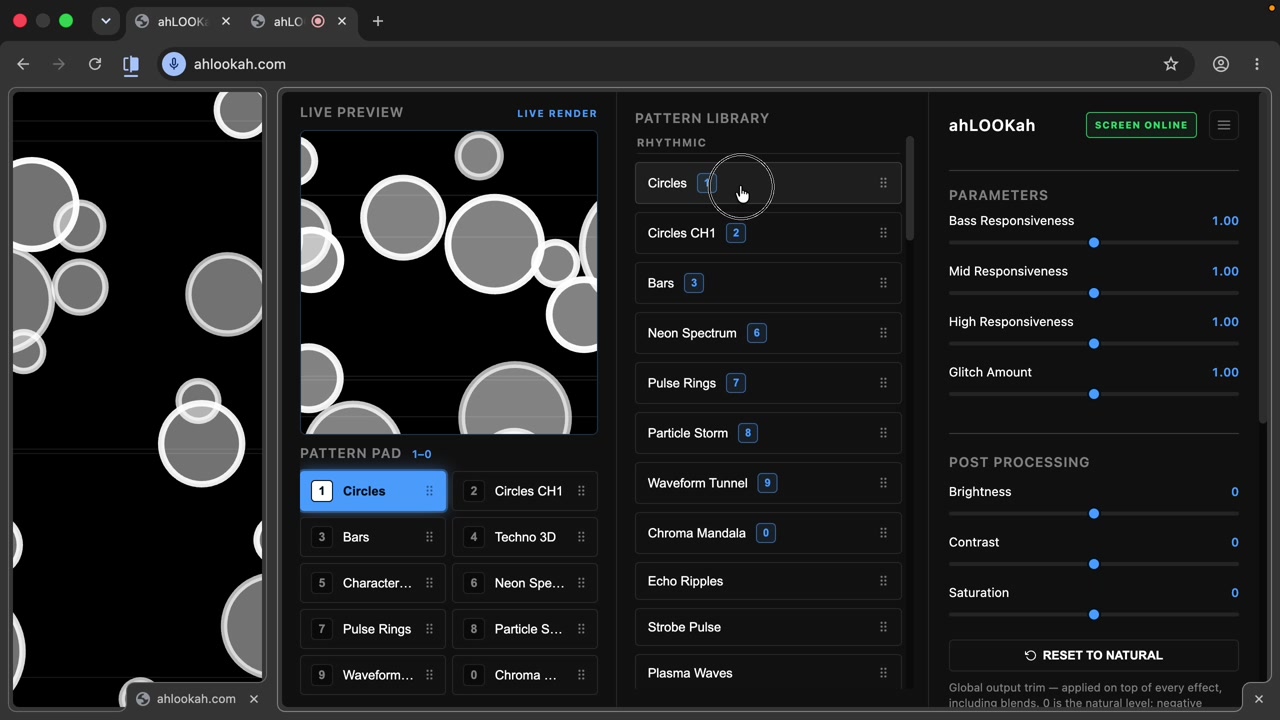
- Live preview (left) — a realtime thumbnail of exactly what's on screen right now, labeled LIVE PREVIEW.
- Pattern pad (left, below preview) — your ten favorite patterns keyed to 1–9 and 0.
- Pattern library (middle) — the full, grouped catalog of effects. Click any pattern to play it live, press / to search it, or click a ☆ to pin it in the Favourites group above the themed groups.
- Parameters & post-processing (right) — sliders for the selected effect, plus global brightness/contrast/saturation trim and the band-split EQ.
The screen window
The screen window is the fullscreen output. It's meant to be dragged onto your projector or second monitor. It renders only the visuals — no controls — and stays in sync with the control panel in realtime.
Two windows, one show The control panel and screen window sync over BroadcastChannel — no server, no lag. Drag the screen window wherever the audience is looking and keep the control panel on your laptop.