Slots & Shortcuts
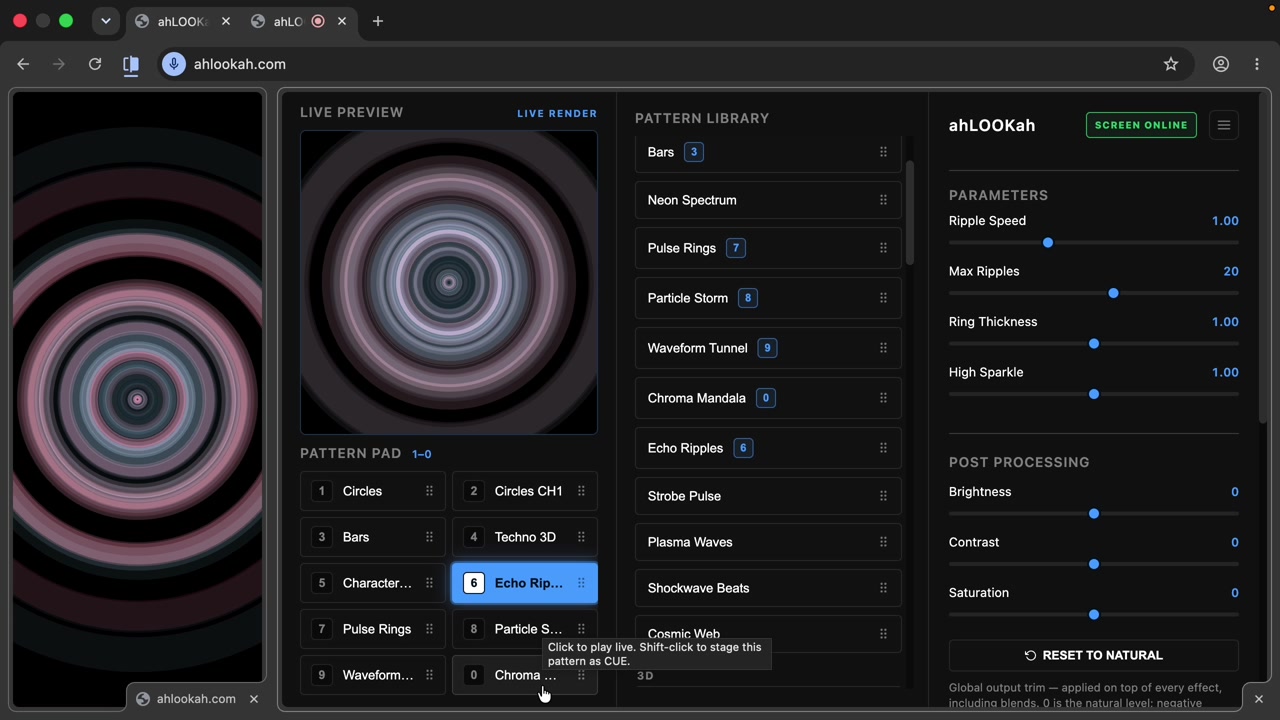
The pattern pad gives you ten one-key shortcuts to the patterns you use most, so you can jump between looks without touching the mouse.
Assigning a pattern to a slot
Found a pattern you like? Drag it from the library into one of the ten pattern pad slots, labeled 1 through 0. Your layout is saved and restored the next time you open the app.
Keyboard shortcuts
With the control window focused, press a number key to play that slot's pattern instantly:
| Key | Action |
|---|---|
| 1–9, 0 | Play the pattern in that slot |
| / | Jump to the pattern library search box |
| Two number keys together | Blend two patterns (see Blending) |
| Shift + number | Stage that pattern as a CUE (see Cue Mode) |
| Enter | Take a cued pattern live |
| Esc | Cancel a cue |
| Enter / Esc in a text field | Stay in that field — the search box keeps your typing, so a cue is never taken or dropped by accident |
Tip Reordering the pad is just a drag-and-drop — the keyboard shortcuts always follow the current layout. Starred patterns are also pinned in a Favourites group at the top of the library for quick access (see Patterns & Parameters).