Patterns & Parameters
A pattern is one visual look. The library is organized into themed groups, with audio-reactive effects and a deliberately non-reactive checkerboard. Click one and it appears on screen instantly.
Browsing the library
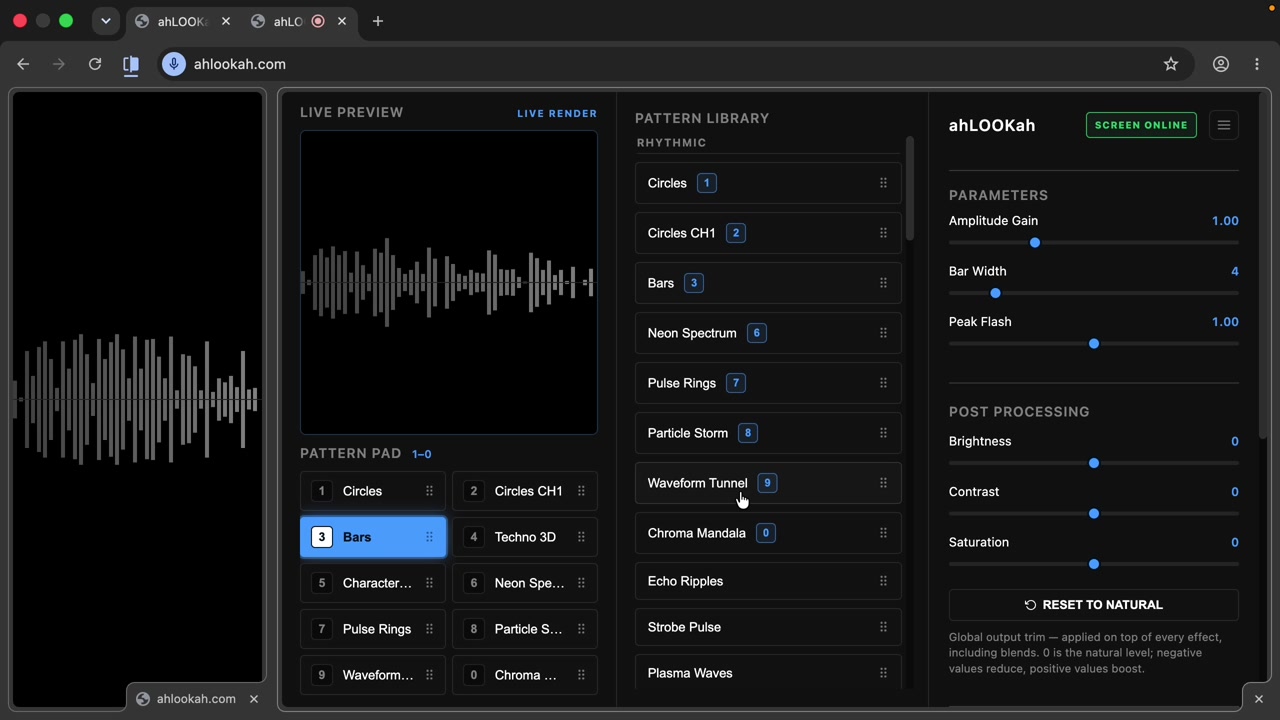
The pattern library sits in the middle of the control panel. Patterns are grouped by theme:
- Simple — Circles, Bars, Checkerboard, and Truchet Relay.
- Rhythmic — beat-driven shapes, plus Membrane Modes.
- 3D — depth-driven structures, plus Voxel Cascade and Gyro Lattice.
- Cinematic / Shaders — atmospheric shaders including Ion Tempest, plus Schlieren Flow, Tidal Glass, and Godray Forge.
- Neon / Lasers — glowing light effects.
- Video FX — live camera effects including Video Chroma, Video Kaleido, Video Edge Glow, and Video Thermal.
- Glitch / Effects — digital effects, plus Bitplane Rewire, Riso Misprint, VHS Head Switch, and DCT Blocks.
- Basics — Solid Color, Color Wash, Color Bars, Noise Static, Film Grain, and Test Card.
- Alphas — Iris Diaphragm, Cellular Gate, and Blinder Matrix: grayscale-on-black mattes for the existing Alpha Blend black key (not proportional luma-to-opacity).
- Media — your own images and videos, loaded from this computer. Empty until you add a file; see Media Patterns.
- Projection Mapping — the reusable mapping patterns you build, each holding up to eight independently warped surfaces. Empty until you add one; see Projection Mapping.
- Custom Scripts — trusted JavaScript from your local folder; see Custom Scripts.
68 built-in patterns. All 50 older entries are preserved; the rejected 60-pattern expansion is replaced by the named additions above. Media and Projection Mapping are dynamic groups: they are always shown so their ADD buttons stay available, but their contents are yours.
Fast building blocks
The retained replacements use distinct vector mechanisms, 3D faces, and shader fields. Each has independent bass, mid, and high structural controls; zero disables a band. Motion Speed controls autonomous animation separately, with no simulated audio in silence. Tidal Glass uses a bounded raymarch. Hover a library button for its band mappings.
Checkerboard is not audio reactive. It starts as stationary black-and-white squares. Change cell size, hues, saturation, lightness, or optional manual drift. Neither audio nor old saved audio-pulse settings can change its size or speed. It stays in Simple and is the default source when you add a mapping inside a Projection Mapping pattern; existing mappings keep their sources.
Camera effects require permission on the output window; the control preview is a placeholder. The remaining camera effects share one camera stream across LIVE and CUE.
Searching the library
Press / to jump to the search box above the list, then type. Matching ignores case and covers each pattern's name, id, group, description, and type keywords — so camera finds the Video FX patterns, media the loaded images and videos, and mapping the projection patterns. Separate terms all have to match, so video edge narrows the list instead of widening it.
A count line shows how many patterns matched, and a query that matches nothing offers Clear search. Groups with results expand automatically while you type; your saved collapsed groups are never changed. Esc in the field clears the query, then leaves the field.
Favourites
Click the ☆ at the right of any library item to favourite it; it turns ★ and the pattern is pinned in a Favourites group at the top of the library, in the order you added them. Click the star again to remove it. Favourites are per-browser UI state, like collapsed groups — they are not part of a pattern's saved parameters — and they travel with exported settings.
A favourited pattern also stays in its own group, so pad keys, drag-and-drop order, and Shift+click cueing behave the same in both places. While a search query is active the Favourites group is hidden, so a result never appears twice.
Tweaking parameters
Every pattern exposes its own sliders. The Parameters panel on the right updates to match the selected effect — bass/mid/high responsiveness, counts, speeds, and more. Drag a slider and the change applies to the output live, so you can shape a look while it's on the projector.
Tip Most patterns react to three frequency bands — bass, mid, and high. The responsiveness sliders control how strongly each band drives the visual.